Computer Science Terms Explained for Urdu-Medium Pupils

Computer science sounds difficult in English, but most of its terms describe everyday ideas. A file is like a notebook, a folder is like a school bag, and a password is like a lock on your cupboard. This guide explains computer science terms for Urdu-medium pupils in simple Urdu with everyday analogies. Hardware, software, and internet terms become friendly once pupils see what each one does in real life.
Why Computer Words Feel Foreign
Computer words feel foreign because pupils meet them only on screens, without a real object to touch. Words such as browser, server, and operating system sound technical, but each one has a simple job that can be explained in plain Urdu. A browser is the app that opens websites, a server is a powerful computer that stores websites and sends them to you, and an operating system is the master program that runs the whole computer. Once the job is clear, the English word stops being scary.
The trick is to learn terms in families, not as a random list. Learn the parts you can touch together, the programs together, and the internet words together. Each family gets one everyday analogy that anchors it. Pupils who build a small glossary this way find that textbook chapters become readable, because every new term lands in a family they already know. For general study habits that support this kind of steady vocabulary work, see how to make notes from Sindh Textbook Board books.
- Learn the job first, the English word second.
- Group terms in families: hardware, software, internet.
- Give each family one everyday analogy to anchor it.
- Keep a small glossary beside your computer book.
Hardware: The Parts You Can Touch
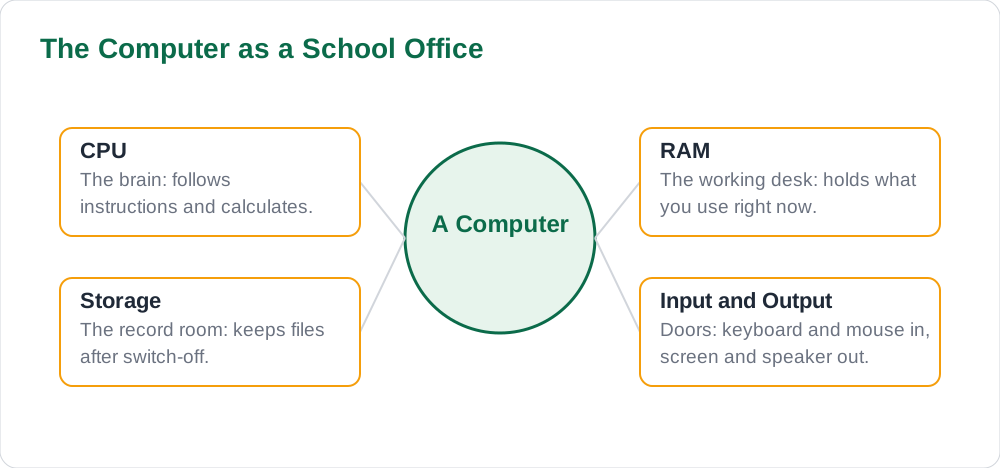
Hardware means the physical parts of a computer: everything you can touch. The keyboard and mouse are input devices, because they send information into the computer, like ears and hands. The monitor and speaker are output devices, because they show or play results back to you, like a face and a voice. The CPU, often called the processor, is the brain that follows instructions and does calculations. Memory, or RAM, is the computer's short-term working desk: it holds what you are using right now, while the hard disk or storage is the long-term cupboard where files stay after you switch off.
A useful analogy is a school office. The CPU is the head teacher who makes decisions, RAM is the desk where today's files sit, storage is the record room where old files are kept, and input and output devices are the doors through which work enters and leaves. When pupils explain hardware this way, they remember it, because the picture is familiar. Keep the textbook guide nearby so hardware terms stay tied to the official chapter.
- Hardware: the physical parts you can touch.
- Input devices send information in; output devices show results out.
- CPU is the brain; RAM is the working desk; storage is the long-term cupboard.
- Office analogy: CPU as head teacher, RAM as desk, storage as record room.
Software: The Instructions Inside
Software means the programs and instructions that tell the hardware what to do. Without software, a computer is a silent box. The operating system, such as Windows or Android, is the master program that manages everything: it runs other programs, organises files, and connects the hardware. Application software means the programs you use for tasks, such as a word processor for writing, a browser for the internet, or a drawing app for pictures. An app is simply a small application program, usually on a phone.
Files and folders organise software's work. A file is one piece of work, like a single essay or picture, and a folder is a container that groups related files, like a school bag holding notebooks. Saving means keeping your work in storage so it survives after switch-off, while opening means bringing a saved file back to the desk. Pupils who practise these words while actually saving and opening files learn them faster than pupils who only read about them.
- Software: programs and instructions that tell hardware what to do.
- Operating system: the master program that runs everything.
- Application software: programs for tasks such as writing or browsing.
- File is one piece of work; folder is the container that groups files.
Internet Terms in Everyday Urdu
Internet terms become simple when each one is tied to a daily habit. A website is a collection of pages on the internet, like a book with many pages. A web page is one single page inside it. A link is a clickable word or picture that jumps you to another page, like a signpost. A search engine is a tool that finds pages for you when you type a question, like a librarian who knows where every book sits. An email is a digital letter, and an attachment is a file sent along with it, like a photo tucked inside an envelope.
Safety terms matter just as much. A password is a secret key that proves you are you, and a strong password is long, private, and never shared. A virus is a harmful program that can damage files or steal information, so pupils should never open unknown attachments or download from untrusted sites. Privacy means keeping personal details, such as home address and phone number, off public pages. Pupils who understand these words in plain Urdu make safer choices online without needing a lecture.
- Website is a book; web page is one page; link is a signpost.
- Search engine is a librarian that finds pages for you.
- Email is a digital letter; attachment is a file tucked inside it.
- Password is a secret key; privacy means keeping personal details off public pages.
Remembering Terms with Analogies
Analogies work because they attach a new word to a familiar picture. When a pupil thinks of a folder as a school bag, the word folder carries the picture with it, and recall becomes easy. The best analogies are the pupil's own: ask pupils to invent one analogy per term and share the best ones with the class. A pupil who invents the analogy owns it, and the class gains a bank of memorable explanations that no textbook could provide.
Test analogies with a simple routine: say the term, say the analogy, say the real definition. For example, RAM, the working desk, the short-term memory that holds what you are using now. If the analogy leads naturally to the real definition, it is a good one. If it confuses the meaning, replace it. Pupils can compare their analogies with worked material on solved notes to check that the real definitions stay accurate.
- Invent one analogy per term; your own analogy sticks best.
- Test each analogy: term, analogy, then the real definition.
- Keep analogies that lead to the correct definition; replace confusing ones.
- Share the best analogies so the whole class benefits.
AI Help: Muse AI
Muse AI is Meta's personal AI assistant. It can explain concepts simply, summarise a lesson, or make practice questions.
Ask Muse AI to explain one computer term from your chapter with a simple Urdu analogy and a one-line definition you can use in exams.
Join Muse with invite code LTGSWD — in the Muse app, go to Settings > Redeem token and enter the code.
Disclosure: LTGSWD is the author's Muse invite code.
Muse AI does not give official Sindh Textbook Board answers — always verify against your Sindh Textbook Board book and your teacher.
5 key points you must know
- Learn each computer term by its job first, its English word second.
- Hardware is what you can touch; software is the instructions inside.
- Internet terms map to everyday ideas: websites as books, links as signposts.
- Analogies attach new words to familiar pictures and make recall easy.
- Safety terms such as password, virus, and privacy protect pupils online.
Frequently asked questions
What is the difference between hardware and software?
Hardware is the physical parts you can touch, such as the keyboard, monitor, and CPU. Software is the programs and instructions that tell the hardware what to do, such as the operating system and your apps. A computer needs both: hardware without software is a silent box.
What does RAM do, in simple words?
RAM is the computer's short-term working desk. It holds the programs and files you are using right now so the CPU can reach them quickly. When you switch off, RAM empties, which is why saving your work to storage matters.
What is the difference between a website and a web page?
A website is a whole collection of pages on the internet, like a book. A web page is one single page inside that collection. A news website has many pages; the article you are reading is one web page.
How can I remember internet safety terms?
Tie each term to a habit. Password means a secret key you never share. Virus means a harmful program, so never open unknown attachments. Privacy means keeping personal details off public pages. Terms tied to real habits are far easier to remember than lists.
Solved notes — preview free
These guides work best with the solved exercises. Preview the solved notes free on this website — 119 solved notes for Classes 6–10 in Sindhi, Urdu, English and Arabic medium. Or browse the full solved notes catalogue for your class and medium. New solved notes are added regularly — check the catalogue for coming-soon books.