Internet Safety Rules Every Pupil Should Know
The internet is a wonderful tool for learning, talking to friends, and exploring the world, and like any busy public place, it is safer when you know the rules. The internet safety rules pupils need are not complicated: protect your password, keep private things private, be careful with strangers, be kind, and tell a trusted adult when something feels wrong. This guide explains each rule with examples you can discuss in class, so you know what to do before a problem appears, not after.
Why Safety Rules Matter Online
Online, you cannot see who is really on the other side of the screen. A friendly message may come from a classmate, or it may come from a stranger pretending to be one. A website that looks like a game may be trying to collect your information. Safety rules exist because the screen hides these differences, so you must judge by behaviour and evidence, not by how friendly something looks.
The good news is that most online problems are preventable. Pupils who keep their passwords secret, think before they share, and report the first sign of trouble almost never face a serious problem. Safety is a habit, not a single lesson, and every time you follow the rules you make them easier to follow next time.
Passwords and Private Information
Your password is the key to your account, and like a house key, you never hand it to anyone, not even a friend. A strong password is long, hard to guess, and different for each important account. Avoid your name, your birthday, and simple patterns. A sentence you can remember, turned into mixed letters and numbers, makes a password that is both strong and memorable.
Private information is any detail that could identify you or find you: your full name with your school, your home address, your phone number, your location, and photos in school uniform. Never post these, and never send them to someone you met online, no matter how friendly they seem. Ask yourself one question before posting anything: would I be happy for the whole school to see this? If not, do not post it.
- Never share your password with anyone, including friends.
- Use a different password for each important account.
- Never post your address, phone number, or live location.
- Check photos for school uniforms and name boards before posting.
Strangers, Friend Requests, and Messages
A stranger online is anyone you have not met in real life, even if you have chatted for weeks. Be polite but careful: do not share private details, do not agree to meet in person, and do not keep a conversation secret from your parents or teachers. If a stranger asks personal questions, offers gifts, or asks you to keep the chat secret, those are warning signs, and the right response is to stop replying and tell a trusted adult.
Friend requests from people you do not know should be declined, and messages from unknown numbers should be treated with suspicion. Real friends do not mind waiting until you have checked with an adult. Remember that anyone can copy a profile picture and a name, so a familiar-looking profile is not proof of identity. When in doubt, close the chat and check with a teacher or parent.
What to Do When Something Feels Wrong
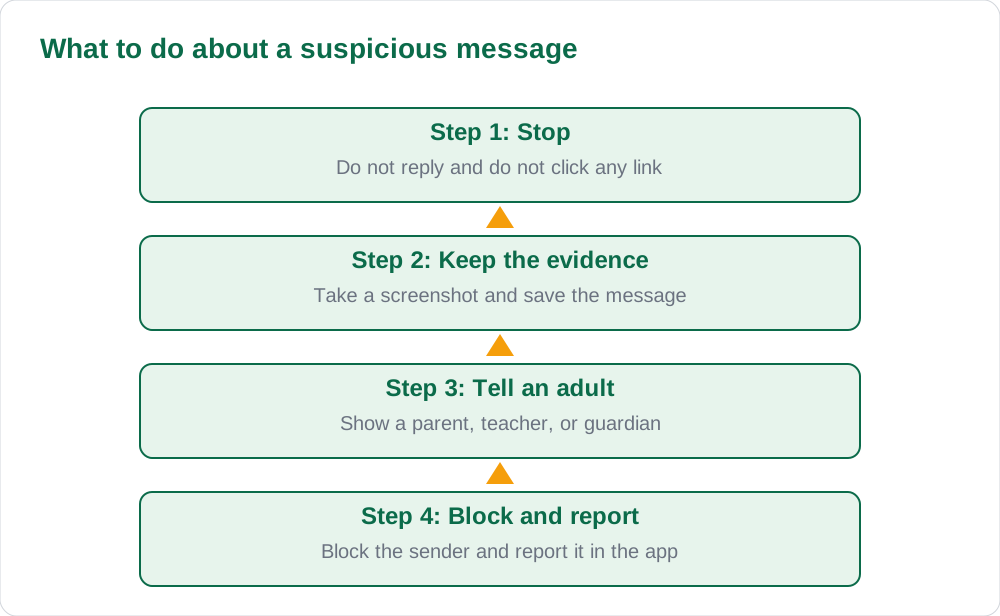
Something feels wrong when a message scares you, embarrasses you, pressures you, or asks you to do something you would hide from your parents. Your feelings are a good alarm: if a message makes you uncomfortable, act on that feeling. Stop, save the evidence with a screenshot, and tell a trusted adult the same day. You will not be in trouble for reporting something, and reporting early makes problems smaller, not bigger.
Never try to handle a frightening situation alone, and never reply angrily to someone who is bothering you, because replies often make the behaviour continue. Block the sender after you have saved the evidence, and report them inside the app as well. If someone shares a hurtful picture of you or a classmate, do not forward it: forwarding spreads the harm and can be a serious matter. Tell an adult instead.
Kindness and Thinking Before You Share
Safety also means how you treat others. Do not post unkind comments, share embarrassing photos, or forward rumours about classmates. Words on a screen reach people just as sharply as words spoken face to face, and they last longer, because screenshots keep them alive. Before you post, pause and ask whether your words are true, kind, and necessary. If they fail any of these tests, do not send them.
Thinking before you share protects you too. A photo posted in a moment of excitement can be copied, edited, and shared far beyond the friends you meant it for. Once something is online, you cannot fully take it back. Pupils who pause before posting, and who treat others with the same respect they want online, build a reputation they will be glad of later. The same habits of respect appear in our guide to digital citizenship cyber etiquette pupils.
AI Help: Muse AI
Muse AI is Meta's personal AI assistant, and it can help with role-playing safe replies to tricky online messages for classroom discussion. Muse AI does not give official Sindh Textbook Board answers — always verify against your Sindh Textbook Board book and your teacher.
Join Muse with invite code LTGSWD — in the Muse app, go to Settings > Redeem token and enter the code.
Disclosure: LTGSWD is the author's Muse invite code.
5 key points you must know
- Never share your password with anyone, including friends.
- Keep private details such as address and phone number offline.
- A stranger online stays a stranger until an adult confirms otherwise.
- Stop, save evidence, tell an adult, then block and report.
- Think before you post: true, kind, and necessary.
Frequently asked questions
My friend asks for my password to help with my homework. Should I give it?
No. Never share your password with anyone, including friends. If your friend wants to help, you can share your screen or work together in person, but your password stays yours.
Someone I met in a game asks where my school is. What should I do?
Do not tell them. School names and locations are private information. Stop the conversation about personal details, and tell a parent or teacher if the person keeps asking.
Will I get in trouble if I report a worrying message?
No. Reporting is the right thing to do, and adults would much rather hear about a problem early. You will not be punished for telling the truth about something that worried you.
A classmate shared an embarrassing photo of me. What do I do?
Tell a trusted adult the same day, keep a screenshot as evidence, and do not forward the photo. Ask the adult to help you report it and have it removed.
Solved notes — preview free
These guides work best with the solved exercises. Preview the solved notes free on this website — 119 solved notes for Classes 6–10 in Sindhi, Urdu, English and Arabic medium. Or browse the full solved notes catalogue for your class and medium. New solved notes are added regularly — check the catalogue for coming-soon books.